
AI agent development company

Key Takeaways:Partnering with American Tech Labs can dramatically improve your business’s growth trajectory. Our customized AI automation solutions utilize cutting-edge technology and strategic insights to enhance scalability and optimize operations, ensuring you maintain a competitive edge. Maximizing Your Business Potential with AI Agent Development Introduction: Breaking Through Growth Barriers Are you finding it increasingly challenging to scale your business in today’s fast-paced digital environment? Identifying the right partner is crucial for unlocking your full growth potential. This article delves into how American Tech Labs can be your strategic ally in leveraging AI agent development for accelerated success. 1. The Crucial Role of Strategic Partnerships in Business Expansion Selecting the right strategic partner is imperative for your business. Here’s why: Access to Specialized Knowledge: Gain insights that drive significant progress. Customized Automation Strategies: Tailored approaches designed to meet your unique business needs. Scalable Operations: Develop systems that grow alongside your business. 2. How American Tech Labs Drives Your Growth American Tech Labs offers a comprehensive suite of services aimed at elevating your scaling efforts: 1. Innovative Technology Integration We enhance your processes through: Next-Generation Technologies: Implement the latest innovations to improve operational efficiency. Automation Tools: Reduce manual effort with state-of-the-art solutions. Data Analytics Expertise: Utilize data insights for strategic decision-making. 2. Smart Digital Marketing Approaches Our marketing solutions include: SEO Services: Improve your search engine rankings and visibility. Content Creation: Develop engaging content tailored to your target audience. Social Media Strategy: Strengthen your brand presence on major platforms. 3. Comprehensive Support At Every Stage Choosing American Tech Labs ensures you receive: Expert Team Guidance: A dedicated team focused on your success. Long-Term Partnership: A commitment to your growth at every stage of development. Customer-Centric Approach: Strategies aligned with your unique business objectives. 3. Key Features of Our AI Agent Development Services Working with us provides significant advantages: Tailored Automation Solutions: Our offerings are designed to align with your growth ambitions. Diverse Skill Sets: Gain a wide array of expertise from tech integration to digital marketing. Data-Driven Decision-Making: Use analytics to streamline and enhance outcomes. 4. Common Scaling Challenges and Our Solutions Businesses frequently encounter obstacles during the scaling process, such as: Resource Constraints: We provide scalable resources to enhance your operational capacity. Limited Visibility: Our marketing initiatives improve your reach and customer engagement. Disorganized Operations: We establish structured workflows to increase efficiency. 5. Steps to Collaborate with American Tech Labs Begin your partnership with us by following these straightforward steps: Assess Your Needs: Identify the areas requiring the most assistance. Schedule a Consultation: Discuss your unique challenges with our experts. Implement Our Solutions: Work alongside our team to execute effective strategies. People Also Ask What distinguishes American Tech Labs in the AI development sector? Our blend of deep expertise, customized automation solutions, and focus on long-lasting partnerships sets us apart. How can technology improve business performance? By incorporating advanced technologies and automation, we enhance operational efficiency and streamline decision-making. Is it feasible to grow without a technology partner? While it’s possible, having a dedicated tech partner can streamline the scaling process and deliver optimized results. What benefits does digital marketing provide? Digital marketing enhances brand visibility, engages target customers, and drives higher conversion rates. Does American Tech Labs offer free consultations? Absolutely, we provide complimentary consultations to explore your business challenges and objectives. Conclusion: Empower Your Business with American Tech Labs Choosing to collaborate with American Tech Labs opens up endless possibilities for your business through innovative technology and strategic support. By aligning with us, you take a significant stride toward achieving scalable growth and operational excellence. Ready to transform your business? Reach out to American Tech Labs today to schedule your consultation!
AI automation services for businesses

Key Takeaways:Collaborating with American Tech Labs can significantly enhance your business growth. Our tailored AI automation solutions leverage cutting-edge technology and strategic insights to boost scalability and streamline operations, helping you maintain a competitive edge. Unlocking Business Potential with AI Automation Services Introduction: Overcoming Growth Barriers Are you struggling to effectively scale your business in today’s rapidly evolving digital landscape? Finding the right partner can be crucial in unlocking your growth potential. This article explores how American Tech Labs can serve as your ideal ally in harnessing AI automation for accelerated business success. 1. The Importance of Strategic Partnerships in Business Growth Selecting the right strategic partner is vital for your business, and here’s why: Access to Specialized Expertise: Gain insights that propel your business forward. Tailored Automation Solutions: Custom strategies designed to fit your specific needs. Scalable Business Operations: Create systems that adapt as your business grows. 2. How American Tech Labs Facilitates Your Growth American Tech Labs provides a suite of services designed to enhance your business scaling efforts: 1. Advanced Technology Integration We streamline your processes with: Next-Gen Technologies: Utilize the latest innovations for enhanced operational efficiency. Automation Solutions: Implement state-of-the-art tools to minimize manual work. Data Analytics Capabilities: Leverage data insights for informed decision-making. 2. Intelligent Digital Marketing Strategies Our marketing services encompass: SEO Optimization: Boost your search engine visibility. Content Marketing: Create engaging content tailored to your audience. Social Media Strategy: Enhance your brand presence across key platforms. 3. Comprehensive Support for Every Step Choosing American Tech Labs means receiving: Expert Team Support: A dedicated group focused on driving your success. Long-Term Commitment: A partner invested in your growth at every phase. Customer-Centric Methodology: Strategies aligned with your unique business goals. 3. Essential Features of Our AI Automation Services Partnering with us comes with notable advantages: Customized Automation Solutions: Our services adapt to your specific growth objectives. Diverse Expertise: Benefit from a range of skills from technology integration to digital marketing. Data-Driven Strategies: Use analytics to refine and enhance your business outcomes. 4. Common Challenges in Scaling and Our Solutions Businesses often encounter hurdles during the scaling process such as: Resource Limitations: We offer scalable resources to expand your operational capabilities. Lack of Visibility: Our marketing efforts elevate your reach and engagement. Disorganized Processes: We implement structured workflows to enhance efficiency. 5. Steps to Collaborate with American Tech Labs Initiate your journey with us through these simple steps: Evaluate Your Needs: Pinpoint the areas where you need the most support. Schedule a Consultation: Talk to our experts about your unique challenges. Implement Our Strategies: Collaborate closely with our team to execute effective solutions. People Also Ask What sets American Tech Labs apart in the market? Our unique combination of in-depth expertise, customized automation services, and a focus on long-term partnerships distinguishes us from the competition. How can technology enhance business outcomes? By integrating advanced tools and automation, we help improve operational efficiency and streamline decision-making processes. Is it viable to grow without a tech partner? While possible, having a dedicated tech partner can significantly facilitate the scaling process and optimize results. What advantages does digital marketing offer? Digital marketing raises brand visibility, engages target audiences, and boosts conversion rates. Does American Tech Labs provide free consultations? Yes, we offer complimentary consultations to discuss your business challenges and objectives. Conclusion: Empower Your Business with American Tech Labs Choosing to partner with American Tech Labs means opening up your business to endless possibilities through innovative technology and strategic support. By aligning with us, you take an important step toward achieving scalable growth and remarkable operational efficiency. Ready to revolutionize your business? Contact American Tech Labs today to schedule your consultation!
Why American Tech Labs is the Best Partner for Scaling Your Business.

Key Takeaways:Partnering with American Tech Labs can elevate your business growth by providing tailored solutions that tap into innovative technology and strategic insights. Our expertise can accelerate your scalability and enhance operational efficiency, ensuring you stay ahead of the competition. Why American Tech Labs is the Best Partner for Scaling Your Business Introduction: The Growth Challenge Are you facing hurdles in scaling your business effectively? In today’s fast-paced digital environment, finding the right partner can be the key to unlocking your growth potential. This article delves into how American Tech Labs stands out as your ideal partner for business scaling, offering innovative solutions to accelerate success. 1. The Importance of Strategic Partnerships Choosing the right strategic partner is critical for your business for several reasons: Enhanced Expertise: Access to specialized knowledge that can drive your business forward. Tailored Solutions: Customized strategies designed to meet your unique business needs. Scalable Operations: Support in creating systems that grow with your business. 2. How American Tech Labs Can Help You Scale American Tech Labs offers a range of services specifically designed to facilitate business growth: 1. Technology Integration We help businesses streamline their processes through: Next-Gen Solutions: Leveraging the latest technology to improve efficiency. Automation: Implementing tools that reduce manual tasks. Data Analytics: Utilizing insights to inform strategic decisions. 2. Digital Marketing Strategies Our marketing expertise allows for: SEO Optimization: Improving your visibility in search engines. Content Marketing: Engaging your audience with targeted content. Social Media Management: Building your brand presence across platforms. 3. Comprehensive Support With American Tech Labs, you get: Experienced Team: A group of professionals dedicated to your success. Long-Term Partnership: Commitment to your growth at every stage. Customer-Centric Approach: Strategies focused on your unique goals. 3. Key Features of Our Service Offering When partnering with us, consider these valuable features: Customized Solutions: We tailor our services to match your specific growth objectives. Expertise in Multiple Domains: Diverse skills ranging from technology development to digital marketing. Analytics-Driven Insights: Using data to refine strategies and improve outcomes. 4. Common Business Scaling Challenges and Our Solutions Businesses often face challenges in scaling, such as: Resource Limitations: We provide scalable resources to expand your capabilities. Poor Visibility: Our marketing strategies enhance your reach and audience engagement. Inconsistent Processes: We help establish streamlined workflows and systems. 5. Steps to Partner with American Tech Labs Follow these steps to start your journey with us: Assess Your Needs: Identify the key areas where you require support. Schedule a Consultation: Discuss your unique challenges with our experts. Implement Solutions: Work closely with our team to execute strategies effectively. People Also Ask What makes American Tech Labs stand out? Our deep expertise, customized solutions, and commitment to long-term partnerships are what set us apart. How can technology improve my business? By integrating the latest tools and automation processes, we help enhance efficiency and decision-making. Can I grow my business without a tech partner? While it’s possible, a dedicated partner can significantly ease the scaling process and improve outcomes. What are the benefits of digital marketing? Digital marketing increases brand awareness, engages your target audience, and drives conversions. Is American Tech Labs’s consultation free? Yes, we offer a complimentary consultation to discuss your business challenges and goals. Conclusion: Empower Your Business with American Tech Labs Partnering with American Tech Labs means unlocking your business’s full potential through innovative technology and strategic expertise. By choosing to work with us, you’re taking a decisive step toward scalable growth and improved operational efficiency. Are you ready to transform your business? Contact American Tech Labs today to book your consultation!
5 Best Content Management Systems (CMS) for SEO.
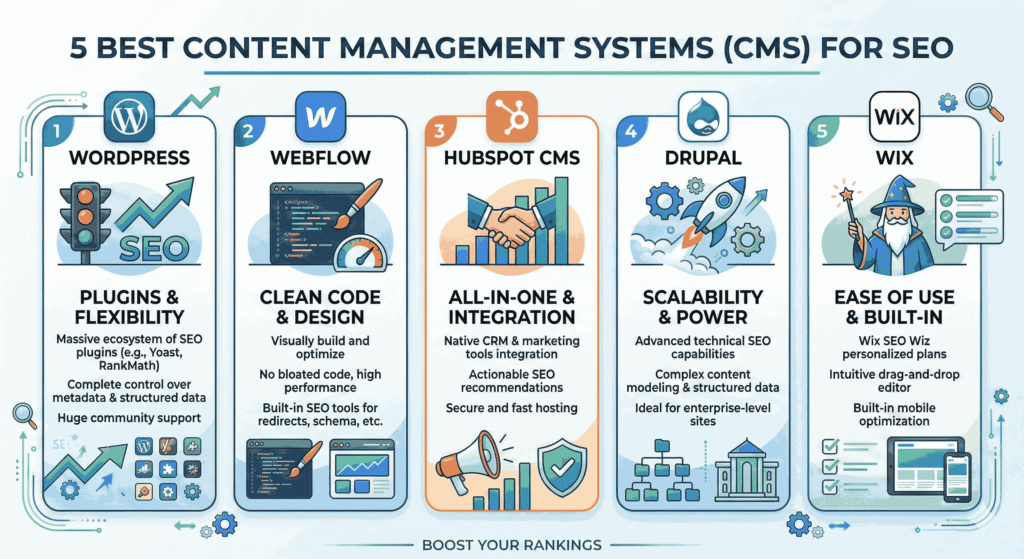
Key Takeaways:Choosing the right Content Management System (CMS) is essential for optimizing your website for SEO. A reliable CMS can enhance your site’s visibility, improve user experience, and streamline management tasks. This guide will help you discover the top CMS options to elevate your online presence. The 5 Best Content Management Systems (CMS) for SEO Introduction: The SEO Struggle Are you struggling to improve your website’s search engine ranking? The right tool can make all the difference. In a digital landscape teeming with competition, a powerful Content Management System (CMS) is crucial for effective SEO strategies. This blog post explores the best CMS platforms that not only make content management easier but also enhance your site’s search engine visibility. 1. Why Your Choice of CMS Matters for SEO Opting for the right CMS is vital for several reasons: SEO-Friendly Structure: A good CMS helps create SEO-optimized URLs and title tags. Responsive Design: Ensure your website is mobile-friendly, boosting your search rankings. Easy Integration: Utilize plugins and tools that simplify SEO tasks. 2. Top Content Management Systems to Consider Explore the following leading CMS platforms that excel in SEO capabilities: 1. WordPress WordPress remains the industry leader with its robust features: Extensive Plugin Library: Numerous SEO plugins like Yoast SEO help optimize your site effortlessly. User-Friendly Interface: Easy for beginners and provides robust options for advanced users. Strong Community Support: Offers extensive documentation and forums for troubleshooting. 2. Joomla Joomla is an excellent choice for more complex websites: Flexible Templates: Design freedom to create unique layouts enhances user engagement. Built-In SEO Tools: Features like SEF URLs for better indexing by search engines. Multilingual Support: Reach a global audience with multi-language capabilities. 3. Drupal Ideal for developers seeking advanced customization: Highly Customizable: Great for technical users needing tailored solutions. Scalability: Perfect for large-scale websites handling significant traffic. Enhanced Security: Strong in-built security features suitable for high-stakes sites. 4. Wix Wix is perfect for small businesses and creatives: Drag and Drop Interface: Simple site-building tools without technical skills. SEO Wizard: Step-by-step guide to optimize your site directly in the platform. Mobile Optimization: Automatically optimizes your site for mobile devices. 5. Squarespace A favorite among designers for its aesthetic capabilities: Beautiful Templates: Stunning designs that enhance user engagement. SEO Features Built-In: Automatically generates meta tags and sitemaps. Integrated Analytics: Track your SEO performance directly within the platform. 3. Key Features for Optimal SEO Performance When choosing a CMS, keep these features in mind: SEO-Friendly Architecture: Look for a CMS that allows for easy URL customization. Plugin/Extension Support: Ensure it integrates with major SEO tools. Analytics Integration: The ability to connect with analytics tools for performance tracking. 4. Common SEO Challenges and How CMS Can Help Businesses frequently encounter challenges affecting their SEO strategy, such as: Slow Loading Times: Choose a CMS that optimizes speed through caching and compression. Poor Mobile Usability: Look for responsive designs that adapt across devices. Content Duplication: Use features that facilitate unique URL structuring to avoid penalties. 5. Making Your Final Decision on a CMS Follow these steps to choose the best CMS for your SEO needs: Identify Your Goals: Understand what you need from a CMS based on your website’s objectives. Compare Features: Evaluate which CMS aligns best with your SEO and content requirements. Take Advantage of Demos: Test features through free trials before committing to a platform. People Also Ask Which CMS is best for SEO? WordPress is widely regarded as the best CMS for SEO due to its extensive plugins and user-friendly interface. Can I use multiple CMS platforms for one website? Typically, it’s best to use a single CMS for consistency; however, some sites utilize subdomains with different platforms. What makes a CMS SEO-friendly? SEO-friendly CMS platforms allow for easy customization of URL structures, meta tags, and sitemaps to boost visibility. Are there free CMS options? Yes, platforms like WordPress and Joomla offer free versions with powerful SEO functionalities. Is technical knowledge necessary for using a CMS? While basic knowledge is helpful, many CMS platforms are designed for ease of use for non-technical users as well. Conclusion: Unlock Your Website’s Potential with the Right CMS Selecting the right Content Management System is essential to optimize your website for search engines and enhance overall user experience. By evaluating platforms like WordPress, Joomla, and Squarespace, you can significantly boost your SEO efforts. Ready to take your website to the next level? Contact American Tech Labs today to schedule a consultation!
The Best Payment Gateways for International E-commerce.

Key Takeaways:When it comes to choosing the best payment gateways for international e-commerce, selecting a reliable and versatile provider is crucial. Factors like transaction fees, currency support, and integration options can significantly impact your online business’s success. This guide will help you find the ideal payment gateway to optimize your global transactions. The Best Payment Gateways for International E-commerce Introduction: Navigating the World of Payment Gateways Are you facing hurdles in processing international transactions for your e-commerce business? As global shopping trends rise, utilizing the right payment gateway is essential to cater to diverse customer needs. This blog post dives deep into the best payment gateways available, offering insights to help you make the most informed decision. 1. The Importance of Choosing the Right Payment Gateway Selecting an appropriate payment gateway is vital for several reasons: Global Reach: Access a broader customer base by supporting multiple currencies and payment methods. Enhanced Security: Protect customer data and transactions with robust security features. Seamless Integration: Ensure compatibility with your e-commerce platform for a smooth checkout experience. 2. Overview of Leading Payment Gateways Here’s a comprehensive look at the top payment gateways suitable for international e-commerce: 1. PayPal PayPal is a widely recognized name in online payments, offering numerous advantages: Global Availability: Available in over 200 countries, supporting 25 currencies. Simple Integration: Easily integrates with most e-commerce platforms, making setup straightforward. Buyer Protection: Provides security for buyers, which can increase customer trust. 2. Stripe Stripe is celebrated for its flexible API and advanced features: Customizable Checkout: Create a tailored checkout experience for your customers. Multi-Currency Support: Allow customers to pay in their preferred currency Robust Analytics: Access detailed reports and insights to optimize performance. 3. Square Square is an excellent option for businesses seeking a comprehensive payment solution: All-in-One Solution: Handles payments, inventory, and customer management under one roof. Export-Friendly: Easily create invoices and reports for your international sales. No Monthly Fees: Only pay per transaction, making it budget-friendly, especially for small businesses. 3. Key Features to Consider When Evaluating Payment Gateways When selecting a payment gateway, focus on these essential attributes: Transaction Fees: Understand the fee structure to accurately calculate costs. Supported Payment Methods: Ensure the gateway supports popular payment options like credit cards, digital wallets, and local payment methods. Customer Support: Access reliable support channels for troubleshooting and guidance. 4. Common Challenges in International Payments and Solutions Businesses often face several obstacles while processing international payments, including: Currencies and Conversion: Use a gateway that offers automatic currency conversion to simplify transactions. Fraud Prevention: Choose gateways with strong security features to minimize fraud risk. Compliance Regulations: Ensure the gateway complies with international payment regulations to avoid legal issues. 5. Making the Right Choice for Your E-commerce Business To select the best payment gateway, follow these steps: Assess Your Target Market: Identify the regions and countries where your customers are located. Evaluate Gateway Features: Compare features against your business needs and customer preferences. Utilize Free Trials: Take advantage of trial periods to test functionality before making a commitment. People Also Ask What is the best payment gateway for small businesses? PayPal and Square are excellent choices for small businesses due to their ease of use and low startup costs. Can I use multiple payment gateways? Yes, using multiple gateways can provide flexibility and cater to different customer preferences. What are international transaction fees? International transaction fees are charges incurred when processing payments across borders, often depending on the payment gateway and currency exchanged. How do I ensure my payment gateway is secure? Select gateways that offer encryption, fraud detection, and PCI compliance to enhance security. Can payment gateways integrate with my e-commerce platform? Most major payment gateways offer plugins or APIs for seamless integration with popular e-commerce platforms. Conclusion: Elevate Your International E-commerce with the Right Payment Gateway Identifying the ideal payment gateway is crucial for your international e-commerce success. By carefully evaluating gateways like PayPal, Stripe, and Square, you can streamline your payment processes and cater to a global customer base. Ready to optimize your payment solutions? Contact American Tech Labs today to book a consultation!
Top Automation Platforms: Zapier vs. Make vs. Custom Solutions.

Key Takeaways:Selecting the right automation platform is essential for improving efficiency and productivity in tech workflows. Whether you prefer a pre-built solution like Zapier or Make, or a customized approach, understanding the unique features and capabilities of each option will help meet your specific needs. Top Automation Platforms: Zapier vs. Make vs. Custom Solutions Introduction: The Challenge of Workflow Automation Are you struggling to streamline your processes and increase efficiency in your tech operations? As businesses evolve, the demand for automation tools to simplify repetitive tasks has surged. This article examines the leading automation platforms—Zapier, Make, and custom solutions—to help you identify which option best suits your unique requirements. 1. Why Automation Platforms Are Crucial Utilizing powerful automation platforms offers numerous advantages, such as: Time Savings: Automate routine tasks to focus on strategic initiatives. Increased Accuracy: Reduce human error by automating data transfers and processes. Scalability: Easily adapt your automation processes as your business grows. 2. Overview of Leading Automation Platforms Here’s a detailed look at the top automation tools currently available: 1. Zapier Zapier is renowned for its user-friendly interface and extensive app integrations: Simple Setup: Create automated workflows (Zaps) quickly without extensive coding knowledge. Extensive Library: Connect over 2,000 applications, maximizing your workflow capabilities. Multi-Step Zaps: Build complex workflows that trigger multiple actions across apps. 2. Make (formerly Integromat) Make offers advanced automation features for more technical users: Visual Builder: Utilize a drag-and-drop interface to design intricate workflows. Real-Time Data Transfer: Experience immediate data updates among integrated applications. Custom Functions: Employ code modules for bespoke automation scenarios. 3. Custom Automation Solutions Developing custom automation might be the ideal path for unique business needs: Tailored Automation: Create precisely what your business requires without third-party constraints. Integration Flexibility: Seamlessly connect with any tool or platform in your tech stack. Future-Proofing: Adapt and expand as your business grows without being limited by existing platforms. 3. Key Features to Consider When evaluating automation platforms, consider these essential features: Ease of Use: Ensure the platform is intuitive, allowing swift adoption by your team. Integration Capabilities: Verify compatibility with the tools your organization uses regularly. Support and Documentation: Access to quality support and comprehensive documentation can ease troubleshooting and enhance usage. 4. Common Challenges and Effective Solutions Organizations often encounter hurdles when implementing automation tools, including: Complexity of Setup: Invest time in training and onboarding to familiarize your team with the platform. Management Overhead: Regularly review and optimize workflows to prevent clutter and inefficiencies. Limited Customization: Consider custom solutions if existing platforms cannot meet your specific needs. 5. Making an Informed Choice To find the best automation platform for your organization, follow these steps: Assess Business Needs: Clearly define your automation goals and challenges. Evaluate Costs: Compare costs against features to understand the value you receive. Leverage Free Trials: Take advantage of trial offers to evaluate platforms firsthand. People Also Ask What is the best automation platform for beginners? For beginners, Zapier is ideal due to its intuitive interface and extensive pre-built integrations. Can automation platforms increase productivity? Yes, by automating repetitive tasks, teams can focus on higher-value activities, improving overall productivity. Are custom automation solutions worth the investment? Custom solutions can be beneficial when off-the-shelf platforms do not meet specific business requirements effectively. How do I choose the right automation platform? Consider your team’s skills, integration requirements, and scalability needs when selecting the right platform. What are the limitations of using Zapier? Zapier may have limitations on the complexity of workflows when compared to more advanced tools like Make. Conclusion: Optimize Your Workflows with Automation Choosing the right automation platform is vital for enhancing efficiency and productivity across your operations. By thoroughly evaluating the strengths and limitations of Zapier, Make, and custom solutions, you can identify the best option for your organization. Ready to elevate your automation strategies? Contact American Tech Labs today to schedule a personalized consultation!
10 Best Project Management Tools for Remote Tech Teams.

Key Takeaways:Choosing the right project management tool is vital for boosting collaboration and productivity among remote tech teams. Each tool comes with unique features, pricing structures, and capabilities designed to meet diverse team needs. 10 Best Project Management Tools for Remote Tech Teams Introduction: The Challenge of Managing Remote Teams Are you facing difficulties in managing your remote tech team efficiently? With the rise of remote work, traditional management methods may fall short. This article explores the ten best project management tools tailored for remote tech teams, providing insights that can help streamline your workflow. 1. Why Remote Project Management Tools Matter Utilizing effective project management tools has several crucial benefits, including: Enhanced Communication: Foster clear communication among team members regardless of location. Improved Accountability: Assign tasks and track their progress to ensure responsibility. Greater Flexibility: Adapt to changing project demands quickly and efficiently. 2. Top Project Management Tools to Consider Here’s a look at ten leading project management tools suitable for remote tech teams: 1. Asana Asana is known for its user-friendly interface: Task Management: Organize tasks, set deadlines, and assign team members. Project Templates: Use pre-made templates for quick project setups. Integration Capabilities: Connect seamlessly with popular tools like Slack and Google Drive. 2. Trello Trello utilizes a card-based system for workflow management: Visual Workflow: Use boards and cards to visualize project stages. Checklists: Create checklists within cards to track task completion. Customizable Labels: Organize cards with color-coded labels for easy reference. 3. Monday.com Monday.com offers extensive customization options: All-in-One Platform: Manage projects, tasks, and workflows in one place. Time Tracking: Keep tabs on time spent on tasks for better productivity. Automation Features: Automate repetitive tasks to save time. 4. ClickUp ClickUp is versatile and highly customizable: Task Dependencies: Set dependencies between tasks for better project management. Goal Tracking: Monitor team goals and objectives effectively. Integrative Features: Connect with various platforms and tools. 5. Wrike Wrike is tailored for collaboration across teams: Real-Time Collaboration: Communicate within tasks to streamline feedback. Workload Management: Visualize team workloads to allocate resources efficiently. Custom Workflows: Create workflows that cater to your team’s specific needs. 6. Basecamp Basecamp simplifies remote project management: To-Do Lists: Keep track of team tasks in one organized space. Scheduling Tool: Coordinate schedules to manage deadlines effectively. Centralized Communication: Use message boards to centralize discussions and updates. 7. Teamwork Teamwork is designed for collaboration and visibility: Project Portfolios: Manage multiple projects and track dependencies. File Sharing: Easily share documents and resources with team members. Time Tracking: Track time for billing and productivity analysis. 8. Zoho Projects Zoho Projects offers cloud-based project management: Gantt Charts: Visualize project timelines and dependencies. Collaborative Tools: Use forums and chats to enhance team interaction. Resource Management: Effectively allocate resources and track availability. 9. Jira Jira is perfect for software development teams: Agile Methodology Support: Utilize Scrum and Kanban boards for agile management. Issue Tracking: Track bugs and project issues systematically. Advanced Reporting: Generate performance reports for project analysis. 10. Notion Notion combines note-taking and project management: Custom Databases: Create customizable databases for different projects. Collaborative Workspaces: Work together in shared spaces for better creativity. Integrations: Connect with other tools for a streamlined workflow. 3. Evaluating Essential Features When selecting a project management tool, consider these important features: User Experience: Ensure the platform is intuitive for easy adoption across your team. Reporting Features: Choose tools that provide customizable reports to monitor progress. Integration with Existing Tools: Look for compatibility with the software you currently use. 4. Common Challenges and Solutions Many teams face obstacles with project management tools, such as: Tool Overload: Focus on a few tools that meet your needs to avoid confusion. Cost vs. Value: Weigh the benefits of features against their cost to find optimal value. Adoption Issues: Train your team effectively to ease the transition and maximize usage. 5. Making the Right Choice To determine the best project management tool for your team, follow these steps: Identify Team Needs: Clearly define the requirements and goals of your projects. Budget Assessment: Consider the overall cost and any additional fees for extra features. Trial Options: Take advantage of free trials to evaluate usability and effectiveness. People Also Ask What is the best free project management tool? Top free project management tools include Trello, Asana, and ClickUp. How do project management tools improve team collaboration? They provide a centralized platform for communication, task tracking, and document sharing, enhancing teamwork. Are premium project management tools worth the cost? Premium tools often offer advanced features, dedicated support, and better scalability, justifying their expense. What should I consider when choosing a project management tool? Evaluate ease of use, essential features, integration capabilities, and overall cost. Can project management tools help with remote work? Yes, they are designed specifically to facilitate collaboration and productivity among remote teams. Conclusion: Optimize Your Team’s Workflow Selecting the most effective project management tool is crucial for enhancing collaboration and productivity among your remote tech teams. By thoroughly assessing the options available and aligning them with your team’s specific needs, you can choose the right solution to drive success. Ready to refine your project management processes? Contact American Tech Labs today to book a personalized consultation!
Best SEO Tools for 2026: Free vs. Paid.

Key Takeaways:Selecting the most suitable SEO tool can significantly impact your online visibility and marketing strategies. Each tool offers distinct features, pricing options, and functionalities, catering to diverse business needs. Best SEO Tools for 2025: Free vs. Paid Introduction: Understanding the SEO Tool Dilemma Are you struggling to find the ideal SEO tool that meets your business’s specific needs? With countless options available, it can be overwhelming to choose the right one. This article delves into the best SEO tools for 2025, comparing free and paid solutions to help you make an informed decision. 1. Why SEO Tools are Essential Utilizing effective SEO tools provides several critical advantages, including: Data-Driven Insights: Gain access to valuable metrics that inform your strategy. Time Savings: Automate tasks like keyword research and site audits to enhance efficiency. Competitive Advantage: Understand your competitors better and refine your approach. 2. Top SEO Tools to Consider Here are comprehensive insights into some leading SEO tools: 1. Ahrefs Ahrefs is renowned for its powerful backlink analysis: Site Explorer: Analyze your competitors’ backlinks effectively. Keyword Explorer: Discover untapped keywords with high traffic potential. Content Explorer: Identify trending topics and content gaps. 2. SEMrush SEMrush is ideal for comprehensive SEO and marketing strategies: SEO Audit Tool: Perform in-depth site audits for optimization. Keyword Magic Tool: Generate keyword ideas from a single seed. Position Tracking: Monitor your rankings over time. 3. Moz Pro Moz Pro stands out for its beginner-friendly interface: Site Crawl: Identify issues and improvement areas on your website. Page Optimization: Detailed recommendations for enhancing individual pages. Link Explorer: Access a vast database of backlinks. 3. Evaluating Key Features When selecting SEO tools, consider the following essential features: User-Friendliness: Choose tools that are easy to navigate and understand. Reporting Capabilities: Ensure customizable reporting to track progress effectively. Integration Possibilities: Look for tools that integrate seamlessly with your existing software. 4. Common Pitfalls and Solutions Many businesses encounter challenges with SEO tools, such as: Overwhelming Data: Focus on the most relevant metrics to avoid analysis paralysis. Cost Management: Balance between free and paid options based on your budget. Consistent Updates: Frequently review tools to ensure they meet industry changes. 5. Making an Informed Choice To select the right SEO tool, consider the following steps: Assess Your Needs: Clearly define your SEO goals and required features. Budget Considerations: Evaluate the total cost of ownership, including potential add-ons. Free Trials: Take advantage of trials to gauge usability and effectiveness. People Also Ask What are the best free SEO tools? Top free SEO tools include Google Analytics, Ubersuggest, and Moz’s Link Explorer. How do SEO tools help improve rankings? They provide insights into keyword performance, backlink profiles, and site health to enhance optimization. Are paid SEO tools worth it? Paid tools often offer more advanced features and comprehensive data that can significantly benefit your SEO strategy. What should I look for in an SEO tool? Consider ease of use, features available, customer support, and how it fits into your overall marketing strategy. Can I use multiple SEO tools? Yes, using a combination of tools can provide a more holistic view of your SEO efforts. Conclusion: Empower Your SEO Strategy Selecting the right SEO tool is crucial for achieving your online marketing goals. By thoroughly assessing your options and identifying your specific needs, you can choose the best solution for your business. Ready to enhance your SEO strategy? Contact American Tech Labs today to schedule a personalized consultation!
A Comparison of the Top 5 Cloud Hosting Providers (AWS, Azure, Google).

Key Takeaways:Choosing the right cloud hosting provider can dramatically influence your business performance and scalability. Each major provider offers unique features, pricing structures, and service levels, providing solutions suited to different needs. A Comparison of the Top 5 Cloud Hosting Providers: AWS, Azure, Google Introduction: Navigating the Cloud Hosting Dilemma Are you finding it challenging to determine the best cloud hosting provider for your business? With numerous services available, it can be daunting to select the one that adequately meets your operational requirements. This article will compare the top cloud hosting providers—AWS, Azure, and Google—equipping you with insights to make an informed decision. 1. Why Cloud Hosting Matters Adopting cloud hosting offers several key advantages, including: Cost Efficiency: Pay-as-you-go pricing models can lower overhead costs. Scalability: Easily scale resources as your business grows without the need for heavy upfront investment. Enhanced Collaboration: Facilitate seamless teamwork through remote access to shared resources. 2. The Top Cloud Hosting Providers Here are in-depth insights into the leading cloud providers: AWS (Amazon Web Services) AWS is renowned for its comprehensive range of services: Robust Global Infrastructure: Extensive network of data centers across the globe. Rich Ecosystem: An array of tools for machine learning, analytics, and IoT. Flexible Pricing: Various pricing options to cater to different budgets. Microsoft Azure Azure is ideal for enterprises that rely on Microsoft products: Strong Hybrid Capabilities: Easily incorporate on-premise infrastructure with cloud solutions. Integrated with Microsoft Services: Streamlined usability for organizations using Microsoft Office and other tools. Enhanced Security Features: Offers compliance certifications and advanced security protocols. Google Cloud Platform (GCP) GCP stands out for its analytics and big data capabilities: Big Query: Powerful tool for analyzing large datasets efficiently. AI and Machine Learning: Advanced machine learning capabilities integrated into its services. Simplicity: User-friendly interface with straightforward deployment of applications. 3. Key Features to Evaluate When assessing cloud hosting options, consider these essential features: Performance: Analyze latency and uptime guarantees. Support Services: Evaluate the availability of customer support and resources. Security Measures: Check for encryption, compliance, and overall data security. 4. Common Challenges and Solutions Businesses often encounter obstacles while transitioning to cloud hosting, such as: Complex Migration Processes: Develop a detailed migration plan to lessen disruption. Cost Management: Monitor usage and implement budgeting tools to control fees. Vendor Lock-In: Maintain flexibility by using multi-cloud strategies. 5. Making an Informed Decision To select the right cloud provider, follow these steps: Define Your Requirements: Clearly outline your technical and business needs. Your Budget: Investigate total costs, including potential overages. Trial Period: Utilize free trials to evaluate services before committing. People Also Ask What is cloud hosting? Cloud hosting uses virtual servers hosted on the internet, providing scalable resources and flexibility for businesses. What are the benefits of using cloud hosting? Benefits include cost savings, scalability, increased collaboration, and enhanced security features. How do I choose the right cloud hosting provider? Consider aspects like feature sets, pricing structures, security, and your business needs. Is cloud hosting scalable? Yes, cloud hosting services can easily be scaled up or down to meet changing resource needs. What should I look for in a cloud hosting provider? Look for reliable performance, robust security, responsive customer support, and clear pricing models. Conclusion: Elevate Your Business with the Right Cloud Provider Choosing the right cloud hosting provider is pivotal for operational efficiency and growth. By analyzing your needs and examining your options, you can identify the best cloud solution for your business. Ready to enhance your cloud strategy? Contact American Tech Labs now to schedule a tailored consultation!
Best CRM Software for Small Businesses in 2026.
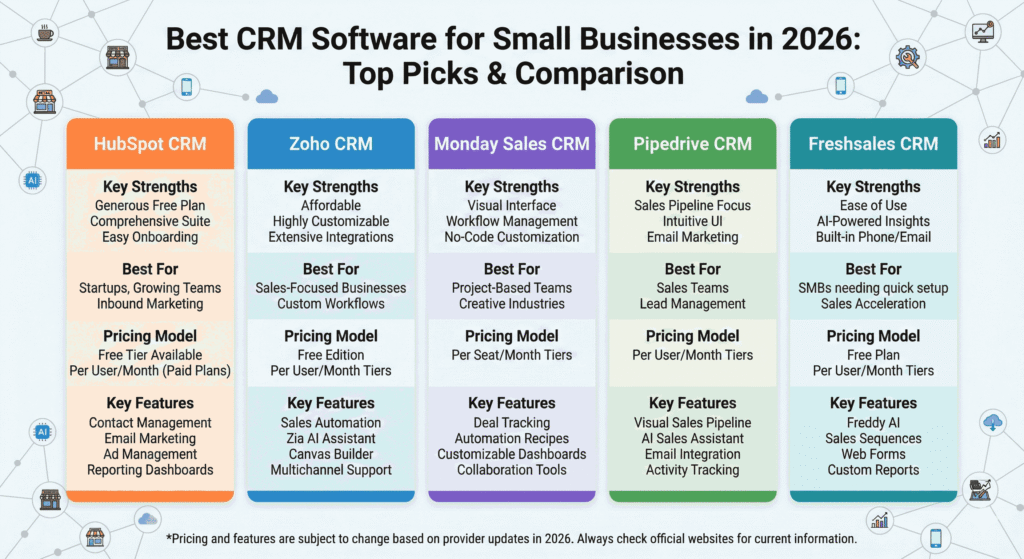
Key Takeaways:Selecting the ideal CRM software for your small business in 2026 can significantly impact your customer relationships and overall efficiency. The right tool enhances productivity and streamlines communication, setting your business up for sustainable growth. The Best CRM Software for Small Businesses in 2026 Introduction: The CRM Dilemma for Small Businesses Are you struggling to find the best CRM software to elevate your small business in 2026? With countless options available, it can be overwhelming to choose the one that perfectly aligns with your needs. This article breaks down the top CRM solutions tailored for small businesses, equipping you with the knowledge to make a confident choice. 1. Why You Need a CRM for Your Small Business Implementing a CRM system provides numerous advantages, including: Enhanced Customer Relationships: CRMs help you manage interactions more effectively, ensuring personalized communication. Increased Productivity: Automating repetitive tasks saves time and allows your team to focus on core business activities. Data-Driven Insights: Gain access to valuable analytics and reporting that drive informed decision-making. 2. Top CRM Software Options for 2026 Here are some leading CRM software solutions that cater specifically to small businesses: Salesforce Essentials Salesforce Essentials stands out for its scalability and powerful features: User-Friendly Interface: Intuitive design that simplifies navigation. Comprehensive Customer Support: Access to extensive training resources. Robust Integrations: Easily connects with other tools like marketing platforms. HubSpot CRM HubSpot offers a free CRM solution that includes: Email Tracking: Monitor customer interactions in real-time. Lead Management: Organize and prioritize leads effectively. User-Friendly Dashboard: Customizable views to suit your workflow. Zoho CRM Zoho CRM is notable for its affordability and customization options: AI-Powered Insights: Advanced analytics to predict sales trends. Multichannel Communication: Manage contacts across various platforms. Flexibility: Tailor the system to fit your specific business needs. 3. Essential Features to Look For When evaluating CRM options, consider these critical features: Customization: The ability to tailor the CRM according to your business processes. Mobile Access: Ensure you can access the CRM on the go, enhancing productivity. Integration Capabilities: Compatibility with existing software and systems. 4. Common Challenges and How to Overcome Them Many small businesses face challenges when adopting a CRM, including: Resistance to Change: Engage your team in the selection process to gain buy-in. Data Migration Issues: Plan for a smooth transition by preparing your data before implementation. Training Needs: Allocate time for comprehensive training to maximize the CRM’s potential. 5. Making the Right Decision To select the best CRM for your small business: Assess Your Needs: Identify specific features that will benefit your business the most. Budget Considerations: Determine what you can afford while considering potential ROI. Trial and Feedback: Take advantage of free trials to receive feedback from your team. People Also Ask What is a CRM, and why do I need one? A CRM (Customer Relationship Management) system helps manage customer interactions, streamline processes, and analyze data to improve business relationships. How do I choose the right CRM for my small business? Consider factors like budget, features, scalability, and how well the CRM integrates with your existing systems. Can CRM software help improve sales? Yes, CRMs provide insights and tools that streamline the sales process, helping you track leads and close deals more efficiently. Is it necessary for small businesses to invest in CRM software? While not mandatory, CRM software significantly enhances customer management, making it easier to grow and retain customers. What common mistakes should I avoid when implementing a CRM? Avoiding inadequate training, failing to customize the system, and neglecting data quality are key mistakes to steer clear of. Conclusion: Empower Your Business with the Right CRM Choosing the best CRM software is a crucial step toward improving customer relationships and business efficiency. Assess your needs and explore the solutions mentioned to find the right fit for your small business in 2026. Ready to enhance your customer management strategy? Contact American Tech Labs today to schedule a consultation tailored to your business needs!